Org Chat: Visualizing Your Business Structure with Clarity
A well-organized team is the engine of any successful project, but explaining that structure to stakeholders, new hires, or even your own team can often feel like drawing a map on a napkin. It gets the point across, but it lacks the clarity and professionalism needed to inspire confidence. This is where a dedicated tool for organizational planning becomes invaluable. The Org Chat - Organizational Charts Keynote Template is designed to solve this exact problem, offering a collection of ultra-modern layouts that transform a simple hierarchy chart into a compelling visual narrative about your company's workflow and talent.
Beyond Basic Boxes and Lines
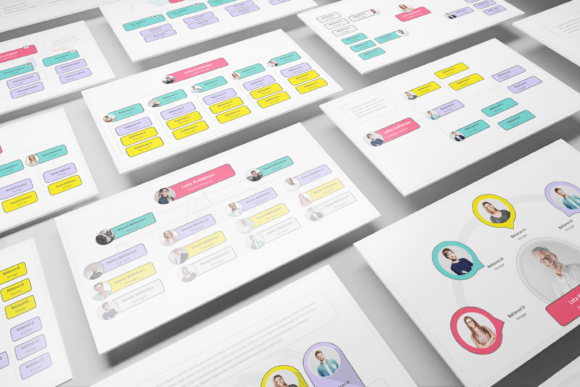
Forget the rigid, uninspired org charts of the past. The visual personality of Org Chat is distinctly contemporary and clean. It embraces modern typography and a minimalist aesthetic, ensuring that the information—the people and their roles—remains the star of the show. Each of the 40 slides is crafted with attention to detail, featuring strong visual hierarchy that guides the viewer's eye naturally from leadership to individual contributors. This isn't just about showing who reports to whom; it's about visualizing the flow of ideas, communication channels, and the collaborative spirit of your organization. The design is multi-purpose, meaning it can feel just as at home in a sleek tech startup's all-hands meeting as it would in a creative agency's client pitch or a non-profit's board presentation.
Practical Applications for Real-World Projects
The true value of a design asset like Org Chat lies in its versatility. For entrepreneurs and small business owners, it's a tool for clarity. When seeking investment or onboarding a new partner, presenting a professionally structured organization with a clean Keynote template instantly builds credibility. It signals that you've thought through your operations and have a clear vision for growth. Marketers and brand strategists can leverage these slides to map out campaign teams, showing how content creators, social media managers, and analysts interconnect to execute a strategy. This visual aid is perfect for internal alignment or client presentations, making complex team dynamics easy to grasp at a glance.
For designers and content creators, the template serves as a foundational design asset. The predefined text styles and master slides ensure brand consistency across your entire presentation. You can easily adapt the color palette to match your client's brand identity, creating a seamless extension of their visual language. The inclusion of unique mockup devices and portfolio slides means you can seamlessly integrate project showcases directly into your organizational overview, telling a complete story of both your team structure and your work. Even for personal use, such as planning a community event or a large-scale creative project, these layouts provide a structured yet flexible framework to organize volunteers, tasks, and responsibilities.
Ensuring Readability and Audience Engagement
A beautiful design is pointless if the audience can't follow the information. Org Chat addresses this with a strong focus on usability. The layouts are built on a clear grid system, using a combination of serif and sans serif font pairings (included as free fonts) to create a comfortable reading experience. The strategic use of whitespace prevents clutter, allowing each team member or department to breathe on the slide. Media placeholders and drag-and-drop image functionality are practical features that encourage you to humanize the chart. Adding team headshots transforms an abstract diagram into a relatable roster of people, significantly boosting audience engagement and making the presentation more memorable.
Tailoring the Template to Your Needs
Choosing a Keynote template is a practical decision, and evaluating fit is key. Start by reviewing the documentation file included with Org Chat. It provides a roadmap for the 40 slides, helping you quickly identify which layout best suits your current project—whether you need a simple hierarchical tree, a departmental breakdown, or a more complex matrix structure. The easy color change feature is critical for aligning the template with your brand's color scheme, a fundamental step in maintaining professionalism and brand recognition. Test the font pairings with your own copy. The modern typography is designed for clarity, but always ensure your specific content maintains legibility at different screen sizes, especially if you'll be sharing the presentation digitally or via PDF.
Remember that the preview images are not included, so your focus should be on the structure and design framework itself. The vector-based icons are a significant asset, allowing you to scale elements without loss of quality and often providing symbolic representations for roles or departments. For commercial projects, always verify the licensing of the template and the included fonts to ensure they cover your intended use, whether for internal documents, client work, or public-facing materials. By leveraging the editable charts and strong typographic foundation, you can move beyond simply displaying an org chart to strategically communicating your organization's strength, adaptability, and professional polish. It turns a necessary business diagram into a powerful tool for storytelling and brand building.