Professional Company Profile Template: 16-Page A4 Design
When you're building a business, your company profile is often the first serious document a client, investor, or partner sees. It's not just a collection of facts—it's a story about who you are, what you do, and why it matters. A well-designed company profile template can make that story land with real impact, and that's exactly what this 16-page A4 template design aims to deliver.
What Makes This Template Stand Out
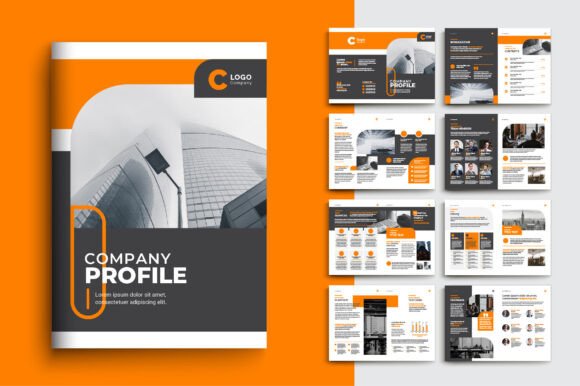
This isn't a generic Word document with a logo slapped on the cover. The Company Profile Template Design is built as a professional-grade brochure layout with 16 carefully structured A4 pages. Each page serves a distinct purpose—cover, about us, services, team, portfolio, testimonials, pricing, contact—so you're not guessing what goes where. The visual style leans modern and clean, with generous white space, balanced typography, and a layout rhythm that guides the eye naturally from section to section.
The template ships as an Illustrator EPS file (compatible with CS6 and CC), which means you get full vector control over every shape, line, and text element. Fonts are free and clearly noted, so there's no scrambling to purchase additional licenses. Images aren't included, but that's actually a strength—you drop in your own photography, illustrations, or brand assets, and the design becomes unmistakably yours.
Designed for Real-World Use
One of the biggest frustrations with template design is finding something that looks polished in the preview but falls apart when you try to customize it. This template avoids that trap. The 0.25-inch bleed and 300 DPI CMYK color mode mean it's print-ready from the start. You won't need to reformat margins or worry about resolution when sending files to a printer. For anyone working in editorial design or packaging design, those specs matter enormously—they're the difference between a file that works and a file that causes headaches at the print shop.
The A4 artboard size is a practical choice for international business documents. It's the standard in most countries outside North America, and it gives you enough vertical space to create impactful layouts without feeling cramped. Whether you're presenting a corporate profile to stakeholders in London or handing a branded booklet to a client in Dubai, the dimensions feel familiar and professional.
Who Benefits Most from This Approach
Small business owners often struggle with brand identity materials because hiring a designer for a full custom brochure isn't always in the budget. A high-quality template bridges that gap. You get the structural thinking of a professional layout—visual hierarchy, consistent spacing, logical flow—without the custom price tag. Entrepreneurs can present their companies with the same visual confidence as larger competitors.
Designers and marketers will find the template useful as a starting point for client projects. Instead of building a 16-page brochure from scratch, you're refining and customizing an existing framework. That can cut production time significantly, especially for clients who need something polished on a tight deadline. The fully editable objects and text mean you can restructure pages, swap color palettes, and adjust typography to match any brand guidelines.
Content creators, bloggers, and publishers can repurpose the layout for media kits, sponsorship proposals, or portfolio presentations. The template's personality is versatile enough to work across industries—tech startups, creative agencies, consulting firms, manufacturing companies—without looking out of place.
Typography and Visual Hierarchy
The fonts included with this template are free, which removes a common barrier to commercial use. But beyond licensing, the typeface choices matter for readability and brand perception. A company profile needs to balance professionalism with approachability—you want headers that command attention and body text that's comfortable to read at length. The template's typography achieves this through contrast: bold, modern display font pairings for headings alongside clean, legible body text that doesn't fatigue the reader.
When customizing, think about how your brand voice translates visually. A serif font for headings can suggest tradition and authority, while a sans serif font feels contemporary and direct. The template's structure supports either direction. If your brand leans creative or artisanal, you might even experiment with a script font or handwritten font accent for pull quotes or callout text—but use those sparingly. The real strength of this design is its restraint.
Practical Tips for Customization
Start by replacing the placeholder images with your own high-resolution photography. Product shots, team photos, office environments, or project examples all work well. Keep image styles consistent—similar lighting, color grading, and composition—so the final document feels cohesive rather than stitched together.
Next, align the color palette with your existing brand identity. The CMYK color mode makes this straightforward for print, but if you're distributing digitally as well, convert to RGB for screen viewing. Most design software handles this conversion, but it's worth checking that your blues don't shift into purple and your reds don't go neon.
Test your font pairing choices by viewing pages at actual print size. What looks balanced on a 27-inch monitor might feel crowded or sparse on paper. Print a test page or two before committing to a full print run. This simple step catches sizing issues that are invisible on screen.
Finally, consider the document's flow. A company profile isn't a random collection of pages—it's a narrative. The template provides a logical sequence, but adjust it to match your story. If your strongest selling point is your portfolio, move those pages forward. If client testimonials carry more weight in your industry, give them prominence. The layout is a framework, not a cage.
File Delivery and Compatibility
The template arrives as a .zip file containing both JPEG previews and the EPS source file. The JPEGs are useful for quick client approvals or internal reviews before diving into edits. The EPS file works in Adobe Illustrator and is compatible with CS6 and later versions, including Creative Cloud. If you're working in Affinity Designer or CorelDRAW, you can typically import EPS files as well, though some elements may need minor adjustment.
Every element on every page—objects, text, shapes—is fully editable. You're not locked into the original layout. Rearrange sections, duplicate pages for extended content, or strip the design down to a leaner 8-page version if that suits your needs better. The template gives you a complete set of design assets to work with, and how you use them depends entirely on your project.
For anyone building or refreshing their company's professional materials, this kind of template represents genuine practical value. It's not about cutting corners—it's about starting from a strong foundation so your time goes into content and strategy rather than pixel-pushing from a blank page.